
2.4 Further Information on Accessible E-Exams
1. What are E-Exams?
The term ‘e-exams’ stands for electronic examinations (e-assessment) and is a term used in examination regulations that is currently evolving. E-exams are conducted within a closed examination system. Such an examination system may, for example, be the examination modules of the learning management systems (LMS) ‘Moodle’ and ‘ILIAS’. Access to these systems can be on-site (in person, e.g. in a computer lab) or remotely via the internet.
Typically, e-exams are characterised by the fact that preparation, administration and marking all take place within the same system.
Overview of Taxonomic Levels of Learning Objectives, Examination Formats and Technologies
Alt-Text: Classification scheme: A graphical overview of taxonomic levels and (e-)assessment formats.
Abbildung
Fig. 1: Taxonomic levels of (e-)examination formats and technologies. Created by Dr Heike Seehagen-Marx and Alian Keller, BU Wuppertal, adapted by the Digital University Unit, University of Jena.
The figure shows a tabular overview entitled ‘Taxonomic Levels of (E-)Examination Formats and Technologies’. It illustrates the cognitive levels according to Bloom/Anderson (recall, comprehension, application, analysis, evaluation, creation), summarised as information recall (30 %), information processing (40 %) and information generation (30 %). Different examination formats are assigned to these levels, such as (e-)MC-exams, (e-)exams, oral examinations, presentations, research papers, essays, performance assessments, seminar papers, simulations, practical examinations, project work, learning diaries and (e-)portfolios. The respective media used (e.g. LPLUS, Adobe Connect, text processing, subject-specific software, Mahara) are listed on the right.
2. Examination Formats
To assess students’ learning outcomes in e-exams, various examination formats are available:
- Closed-Book-Exams: No resources other than those specified by the examiners are permitted.
- Cheat-Sheet-Exams: Students are permitted to use their own exam aids (‘cheat sheets’).
- Open-Book-Exams: Textbooks and selected materials may be used.
- Open-Web-Exams: All resources are permitted, provided that there is no live communication with other students.
The advantages of open formats lie in the promotion of skills, authentic assessment and better alignment with Constructive Alignment. However, the use of such formats requires tutorial sessions. It is important that both subject-specific knowledge and application-oriented skills are taught.
Overall, it should be noted that the examination regulations of the respective higher education institution must be observed. Particular attention must be paid to these regulations with regard to permitted aids, supervisory rules, and the conduct of examinations.
3. Question formats in e-exams
Questions in e-exams can take various formats. Tutors have the option to design exams in a way that suits both the course type and the specific purpose. The following question formats are typical:
- Open-ended formats: entering a result (e.g. a number or value), free-text response, scan-based question.
- Closed-ended formats: multiple-choice questions, single-choice questions, Kprim questions (four statements, two of which are correct), matching questions, classification questions, cloze tests (‘CLOZE’), image annotation/hotspot/image map.
- Subject-specific formats: formula entry (e.g. in mathematics or natural sciences), programming tasks (coding tasks), other domain-specific formats (depending on the area of expertise).
Although the learning management system ‘Moodle’ was not originally developed primarily for conducting e-exams, the ‘Test’ activity offers a suitable examination function. This also enables summative final assessments or performance evaluations to be carried out. In doing so, lecturers have a wide range of different question types at their disposal:
- Multiple-choice questions: Students select one or more correct answers from a given list.
- Single-choice questions: Exactly one answer is correct.
- Free-text questions: Students enter a longer answer in text form.
- Matching questions: Items from two columns (e.g. terms and definitions) must be correctly matched.
- Numerical/calculation questions: Students provide numerical results, with a tolerance range where applicable.
- Cloze questions: There are gaps in the text that must be filled with individual terms, numbers or short phrases.
3.1 Suitable question types
The following types of questions can be answered by all students and are (largely) accessible. In this context, ‘largely’ means that the tasks are accessible to most people with impairments, but there are still some limitations that may present a barrier for certain groups. These barriers can often be reduced through the use of assistive technologies or reasonable adjustments.
Multiple-choice questions (largely accessible)
Typical barriers:
- Screen readers do not always recognise the order or grouping of answer options correctly if the HTML structure is incorrect.
- If contrast is insufficient or keyboard navigation is missing, answer options are difficult to select.
Appropriate measures and settings:
- Clear HTML structure (e.g. radio buttons with correct <label>-links).
- Avoid using graphical checkboxes or images as the sole indicators of answers.
- High colour contrast (at least WCAG 2.1 AA).
- Ensure keyboard accessibility (Tab-navigation, no reliance on the mouse).
- Formulate answer options using text (no symbols alone).
- If necessary, enable screen-reading software or integrate accessible plugins.
Didactic implementation:
- Clear, concise wording and no double negatives.
- Avoid using visual cues such as colours to indicate distinctions (e.g. ‘green = correct’).
Text-based question types: short-answer and free-text (largely accessible)
Typical barriers:
- Input fields can sometimes be difficult for screen readers to access.
- Time pressure can be problematic for users with motor impairments or those using alternative input devices.
Appropriate measures and settings:
- Accessible input fields with descriptive labels and clear focus indicators.
- Allow for extended editing time or time extensions.
- Enable the auto-save-function to prevent data loss.
- Ensure compatibility with speech recognition software (e.g. Dragon NaturallySpeaking).
- Allow zooming and font size adjustment without disrupting the layout.
Didactic implementation:
- Clear task descriptions with precise requirements (e.g. specify word limits or character limits).
- Use of free-text fields for open-ended, reflective or transfer-oriented tasks that do not aim purely at reproduction.
Matching question types for words and phrases: Random short-answer matching (similar to matching using a drop-down list) (largely accessible)
Typical barriers:
- Drag-and-drop interactions are often inaccessible to screen reader and keyboard users.
- Drop-down-menus do not always work correctly with screen readers.
Appropriate measures and settings:
- Prioritise drop-down-based formats over drag-and-drop-based ones.
- Ensure that options can also be selected using the keyboard.
- Offer alternative presentation formats (e.g. numbered lists instead of graphical layouts).
- Maintain a logical order of options (avoid random, context-free arrangements).
Didactic implementation:
- A limited number of matching options per task to avoid cognitive overload.
- Use clear, high-contrast fonts and unambiguous terms.
Types of math questions: Numerical, simple calculations, calculations and calculated multiple-choice (largely accessible)
Typical barriers:
- Formulas or symbols are unreadable to screen readers without MathML or LaTeX support.
- Input fields can sometimes be difficult to navigate using assistive technologies.
Appropriate measures and settings:
- Integrate mathematical formulas using MathML or LaTeX, not as image files.
- Provide alternative text (alt text) for symbols or formulas.
- Specify consistent input formats (e.g. decimal separators, units).
- Provide input assistance (virtual keyboard, formula editor).
- Allow sufficient time for inputting complex formulas.
Didactic implementation:
- Design tasks so that the method of calculation and understanding are the focus, not merely the result.
- Option to explain intermediate steps in text form.
- Check the exercises using a screen reader (e.g. NVDA, JAWS).
3.2 Which question types in Moodle should I avoid using?
Not all question types are equally accessible to all students. The list below therefore provides an overview of the types of questions that should be avoided.
Question type: Arrangement
Arrange the randomly ordered items in a logical order.
Do not use because …
- It is not accessible to people with visual impairments, motor impairments or mental illnesses.
- It cannot be controlled via keyboard.
- It cannot be read by a screen reader.
Question type: Drag-and-drop on an image
Images or texts are dragged onto areas of a background image.
Do not use because …
- It is not accessible to people with visual impairments, motor impairments or mental illnesses.
- It cannot be controlled using a keyboard.
- It cannot be read by a screen reader.
Question type: Drag-and-drop on text
Missing words in the question-text are filled in using drag-and-drop.
Do not use because …
- It is not accessible to people with visual impairments.
- It cannot be controlled using a keyboard.
- It cannot be read by a screen reader.
Question type: Drag-and-drop onto markers
Markers are dragged onto a background image using drag-and-drop.
Do not use because …
- It is not accessible to people with visual impairments, motor impairments or mental health conditions.
- It cannot be controlled using a keyboard.
- It cannot be read by screen readers.
Question type: Extended cloze
A question type that involves filling in the blanks. It allows for ‘drag-and-drop’ and ‘drop-down’ answer options, with incorrect options displayed to distract the respondent whilst answering the question.
Do not use because …
It is not accessible to people with motor impairments or mental illnesses.
Question type: Cloze
Questions of this type are very flexible. The text must be formatted to create a gap in order to perform integration of multiple-choice-questions, short-answer questions or numerical questions.
Do not use because …
It is not accessible to people with motor impairments or mental illnesses.
Question type: Selection of cloze
Missing words in the question text are filled in using drop-down-menus.
Do not use because …
It is not accessible to people with motor impairments or mental illnesses.
Question type: Matching
The answer to each of the sub-questions must be selected from a list of options.
Do not use because …
It is not accessible to people with motor impairments or mental illnesses.
No meaningful answer regarding accessibility can be given for the following question types:
- All-or-nothing multiple choice
- CodeRunner
- Diagram
- Kprime
3.3 How can I make my examinations as accessible as possible?
To ensure that the examination itself is also accessible and can be taken by all students, the following points should be borne in mind:
- Ensure that both your examinations (documents, Moodle assignments) and the software programmes to be used are accessible.
- Ensure that students have the opportunity to read through all the tasks first before they have to answer them. This gives them the chance to decide for themselves the order in which to tackle the tasks, provided that a specific order does not offer any added didactic value.
- If the order is fixed, this should be communicated to students in advance.
- To aid navigation, the integration of a table of contents should occur at the start of the exam.
- Practise using digital programmes with your students so that they can concentrate on the content of the exam.
- At the start of the exam, state the duration, and during the exam, give timely notice of the approaching end of the exam.
- Provide details of technical support.
- Provided it does not conflict with the purpose of the exam, students should be given the choice of which method they wish to use. Furthermore, these methods should be described in detail and practised. Possible methods for sitting written examinations include: scanning handwritten text, uploading digital documents, typing on a PC keyboard, dictating to an assistant, etc.
- Exam invigilators should be trained to recognise that students with impairments may behave differently in an online setting compared to other students. Among other things, they may use medical devices or specific techniques to help them relax, visit the toilet more frequently, or have an assistant assisting them.
A guide containing a compilation of information, tips and tricks, available for download, as well as a corresponding checklist to work through, is available under 3. Implementing accessible e-exams.
4. Online Exams
The use of electronic information and communication channels is central to online examinations. Online examinations can generally be divided into so-called ‘take-home’ and on-site examinations. The term ‘digital remote examination’ is sometimes used synonymously with ‘online examination’, but in the stricter sense it refers to examination formats that are taken outside the higher education institution – that is, regardless of location and often from home. This term was used in particular in higher education regulations during the COVID-19 pandemic to distinguish such remote examinations from digitally supported face-to-face examinations.
‘Take-home’ examinations are predominantly, though not exclusively, used to complete asynchronous and longer examination tasks. They usually take place outside the university and offer students greater flexibility in terms of time and location.
On-site online examinations, by contrast, are conducted in a supervised environment, typically in specially equipped computer labs or examination centres. They are organised similarly to traditional face-to-face examinations, but use digital tools for completing and submitting the examination tasks. Both formats require careful technical, didactical and legal planning to ensure equal opportunities, data protection and accessibility.
4.1 ‘Take-home’ Exams
Unsupervised ‘Take-home’ Exams
‘Take-home’ examinations do not take place at the university, but are typically sat in the students’ own homes. They are similar to traditional written examinations, but differ in that they can be taken anywhere and, often, at any time. The examination questions are provided electronically and the answers are submitted digitally. These are usually tasks that can be completed within a limited time frame.
‘Take-home’ exams are often structured as open-book or ‘suitcase’ exams, in which the use of reference materials is expressly permitted. This shifts the focus away from the mere reproduction of knowledge towards tasks involving the transfer and application of knowledge, which requires a correspondingly high level of preparation.
A recurring issue in connection with unsupervised online examinations is the concern about cheating. Some students fear being put at a disadvantage by the unfair advantages enjoyed by others. At the same time, it is emphasised that cheating is, in principle, possible in any form of examination – regardless of whether it takes place in person or online. Control is primarily achieved here through didactical measures:
- Prevention of cheating (e.g. individualised tasks);
- detection of cheating (e.g. plausibility checks);
- subsequent reviews of any anomalies.
Furthermore, the home examination setting itself can pose a challenge. It is typically not ideally suited to focused work and, unlike a neutral examination room, can introduce additional stress or distractions.
Supervised ‘Take-home’ Exams: Online Proctoring
So-called ‘online proctoring’ is a location-independent digital supervision system which, with the aid of specialised software, is designed to prevent or detect instances of cheating. Various forms of monitoring may be used, such as video and audio recordings, screen monitoring, clickstream analysis or system logging.
Depending on the intensity of the monitoring, a distinction can be made between different proctoring levels:
- Level 0: Supervision via video conference with up to approximately 50 students; no recording.
- Level 1: Use of specialised proctoring software with one camera, website logging and optional recording.
- Level 2: One camera, plus application logging and computer lockdown, with optional recording.
- Level 3: Two cameras, comprehensive activity logging and computer lockdown, with optional recording.
The use of such systems is legally and ethically controversial, particularly with regard to data protection and informational self-determination. The permissibility and specific arrangements for recordings vary depending on the federal state and higher education regulations.
Proctoring can take place both digitally (remotely) and in person, for example in special, screened-off examination rooms with technical surveillance.
4.2 On-site Online Examinations
On-site online examinations take place at the university itself. To ensure that these can be successfully conducted on campus, various specific considerations must be taken into account. For example, the circumstances regarding the premises, infrastructure, and hardware must be clarified. Furthermore, a stable internet connection must be ensured.
Required spatial and technical infrastructure:
- Computer labs (fixed computer workstations);
- mobile computer stations (computer workstations that can be set up in different rooms);
- BYOD – ‘Bring your own device’ (candidates bring their own devices to sit the exam; sufficient power sockets should be available).
Exam options:
- Open-book written examinations;
- examinations using third-party applications;
- e-examinations within the same system.
4.3 Results of a student survey
The student survey conducted at Bielefeld University on online examinations in the 2020/2021 winter semester shows that, overall, just under 65 % of students were satisfied with the organisation of this form of examination.
Many students found the opportunity to complete a mock exam in advance particularly helpful. Of those respondents to whom this was offered, a clear majority spoke positively about the preparation. Similarly, over 85 % of those respondents who were provided with the instructions and information materials rated them as (very) helpful. These measures apparently played a decisive role in ensuring that just under 70 % of students felt well-prepared for the conduct of their online examinations.
These results show that thorough preparation for the technical requirements of an online examination is advisable. Despite the generally positive outcome and the preparatory measures, around one-third of respondents experienced technical difficulties and around one-quarter encountered organisational difficulties. Whilst most problems were resolved during the exam, a small proportion of students had to abandon the exam early due to persistent technical faults.
Furthermore, it emerged that many students found online exams more demanding and stressful than face-to-face exams. Around 40 % reported higher demands, and a similarly large proportion felt that stress levels had increased significantly. Technical difficulties played a key role in this, as they can arise unexpectedly and create additional pressure – making a reliable technical infrastructure and clearly defined support all the more important.
The ‘open-book’ exam format within the online examination system proved particularly popular. Around half of those surveyed would like to see this format used for future exams, as it was perceived as fairer, more flexible and more conducive to learning. Satisfaction with open-book exams that had already taken place was also exceptionally high, with almost 80 % of respondents giving positive feedback.
5. Implementation of E-examinations
When implementing e-exams and digital exams in general, the interplay between the following four areas of focus is of great importance: law, technology, didactic methods and, finally, organisation. These form the structural framework.
The first area, ‘law’, covers all considerations relating to examination law and data protection (e.g. the Equal Treatment Act, specific regulatory frameworks). The second area, ‘Technology’, relates to all technical and infrastructural measures that must be taken into account in digital examinations, and particularly in e-exams (e.g. the technical stability and security of the examination software). The third area of action, ‘Didactic methods’, encompasses all didactic and psychological framework conditions (e.g. the validity and reliability of examination items). The area of action ‘Organisation’ concerns measures relating to organisational and logistical considerations (e.g. supervision of examination candidates).
What all four areas of action have in common is that the measures and actions within them vary in terms of ease of implementation and are interdependent. Accordingly, the entire implementation of digital and e-exams involves a combination of measures from all areas of action.
5.1 Preliminary considerations and effort
Before an e-exam can be conducted, it is necessary to give some thought to the matter in advance and clarify various factors. The following aspects should be taken into account:
- Technical considerations;
- legal considerations;
- didactical considerations;
- premises, including room bookings where necessary;
- software, including software training prior to first use where necessary.
When conducting e-exams, it is not enough to simply consider the theoretical aspects. The necessary equipment must also be provided:
- Software and, where necessary, hardware must be made available.
- A stable internet connection must be in place. If a Save-Exam-Browser is used, a second device is required for supervision, e.g. via Zoom.
- Staff must be made available for supervision, technical support and to answer questions regarding the exam content.
- Premises must be available and suitably equipped on site. At home, students need the opportunity to sit the exam in peace and quiet.
- Exam invigilators can take part in training on digital skills.
All topics and questions that need to be taken into account and addressed on a case-by-case basis throughout the process of conducting accessible e-exams can be found in the collection of questions on the procedure for e-exams under 3. Implementing accessible e-exams.
5.2 E-examinations and Adjustments to compensate for Disadvantages
Disadvantage compensation is a legally regulated mechanism designed to ensure fair study conditions. It serves to offset structural or individual disadvantages that might prevent students from achieving their academic and examination results under equal conditions. Consequently, adjustments to the timing and/or format of assessment tasks may be required. This applies in particular to written examinations, presentations, oral examinations, coursework, reports and final theses. Students are entitled to reasonable adjustments. The right to disadvantage compensation for students with an impairment, chronic or mental illness is enshrined in law. It is the responsibility of the students themselves to apply for reasonable accommodation. They can seek support from the representative for students with disabilities or chronic illnesses.
Each case is assessed individually to determine what disadvantage arises from the impairment and how this can be appropriately accommodated. The measures put in place to compensate for disadvantages often relate to face-to-face examinations. However, many recommendations for face-to-face examinations can also be easily adapted to digital formats. For example, key areas of action and possible measures for disadvantage compensation may include extending the writing time for written examinations or assignments, extending the examination time to account for actual breaks taken, providing technical aids, and permitting the use of personal assistance. The University of Hamburg sets out a detailed list in a table. This lists the standard measures for compensating for disadvantages in face-to-face written examinations and outlines whether, and if so how, these can be implemented for electronic examinations or ‘take-home exams’ similar to written examinations. The detailed table and further helpful information can be found in the University of Hamburg’s PDF document ‘How can measures to compensate for disadvantages in face-to-face examinations be applied to digital examinations?’ (PDF).
6. Barriers in Digital Examinations
In early 2022, a survey on digital accessibility was carried out at the four universities involved in the SHUFFLE project. Students, lecturers and senior staff were surveyed via an online questionnaire and in interviews.
In the online survey, students were asked, amongst other things, about barriers they faced in digital exams. 60 per cent of respondents who had already taken part in digital exams encountered the following barriers:
- Time constraints;
- sensory overload;
- stress and psychological strain (due to uncertainty about how to use digital content and technology, fear of being observed, and difficulties concentrating);
- problems with a stable internet connection;
- inadequate hardware and software.
The survey results suggest that there may be fundamental problems with digital exams.
Regarding the time allowed for the exam, one student commented as follows:
Unfortunately, the given time for most online exams were extremely short. Professors should understand that we are humans too and we need time to read, think and answer the questions given. I think they are doing this to prevent us from “cheating”, but we are human, it is not possible to respond in a second like robots. How can I focus on questions if I'm looking at the remaining time every ten seconds and my heart beats twice as fast as it should?
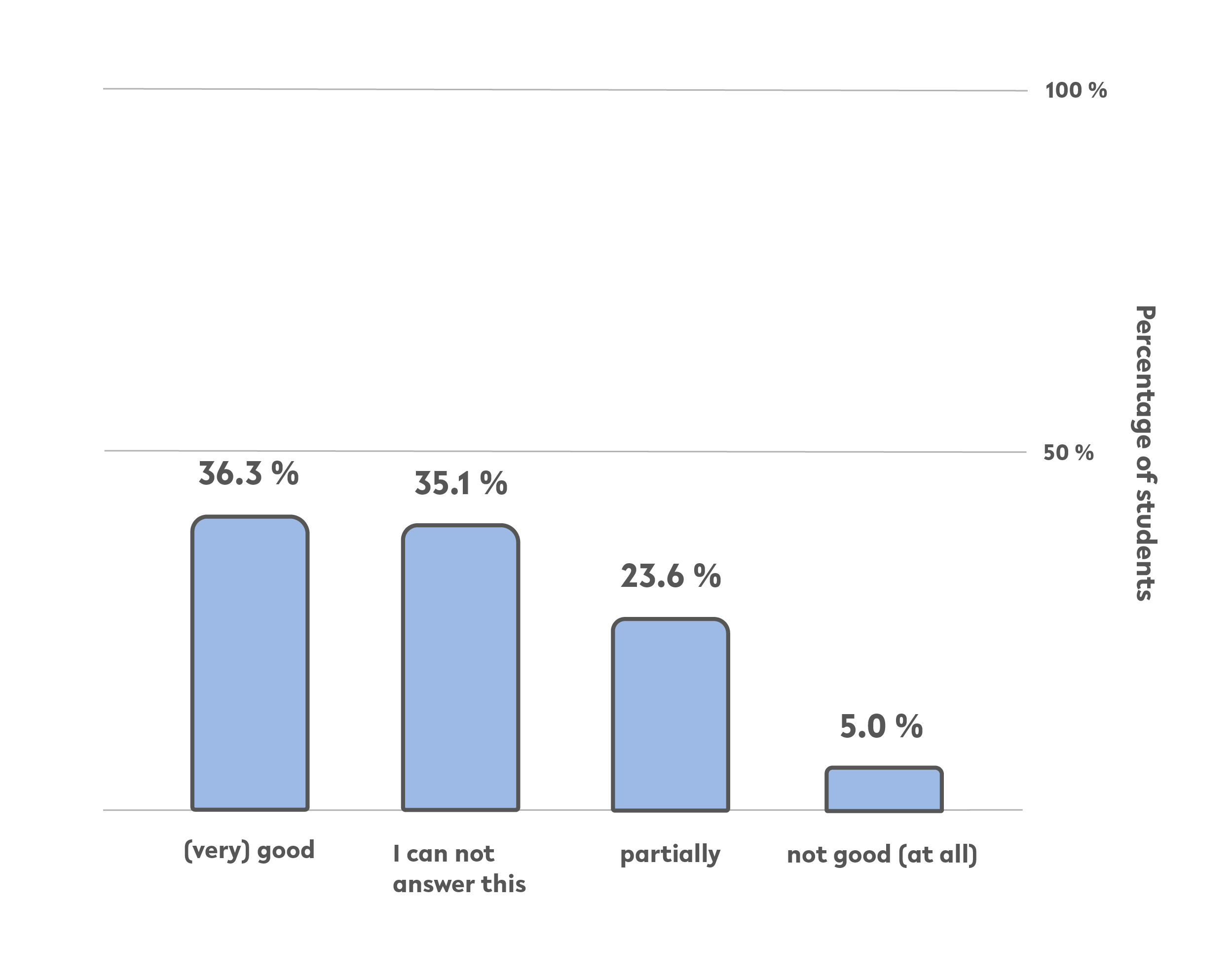
Fig. 2: Chart illustrating the question ‘How do you get on with e-exams?’, own illustration
The question “To what extent do you cope with the following aspect: e-exams on the learning platform?” revealed that around a third cope '(very) good' with e-exams on learning platforms. Just under 24 % cope ‘partially’ with e-exams and 5 % ‘not good (at all)’.
No comments to display
No comments to display