
8. Course objects with barriers
Contents: The importance of taking into account course objects with barriers; a list of course objects.
Why should course objects with barriers be taken into account?
Although ILIAS takes care to design and programme the learning platform and the resources it contains to be accessible, this is a long process – unfortunately, not all objects are yet accessible. It is therefore important to avoid course objects that present barriers.
Below, we outline various course objects and their accessibility issues for students with certain disabilities. To ensure equal access to course content, we recommend that you avoid using course objects that present barriers.
What types of course objects with barriers are there?
News feed
In an ILIAS course room, there is a calendar and a news feed on the right-hand side (see Fig. 1).
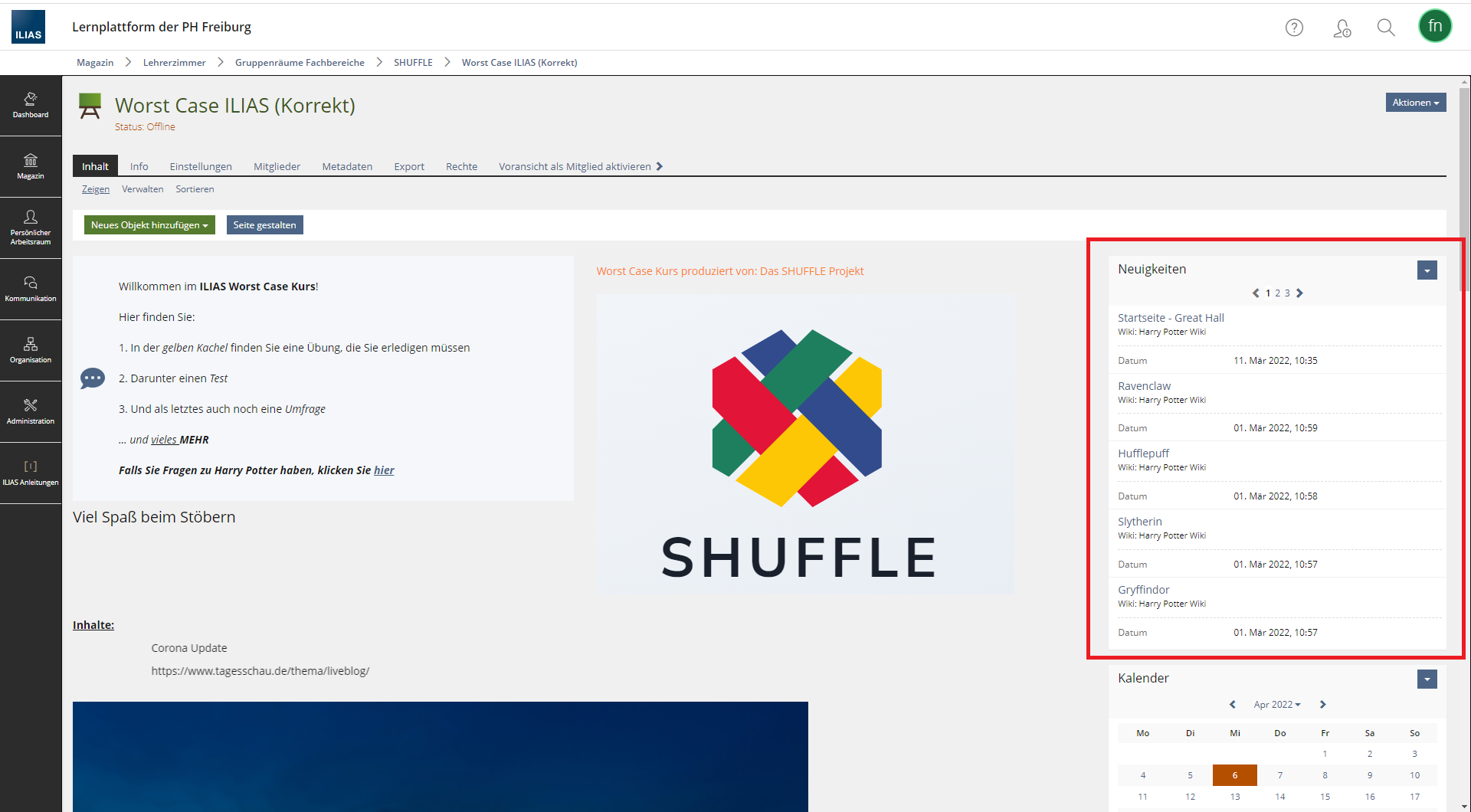
Fig. 1: News feed in the ILIAS course room.
The news feed shows when new files have been uploaded. This feed contains a lot of information at once, which some users may find difficult to navigate and understand. A widget like this can therefore lead to sensory overload, for example, for neurodivergent students.
You can disable the news feed by unticking the ‘News Block’ box in the ‘Settings > News’ tab (see Fig. 2). Click the ‘Save’ button to apply the setting.
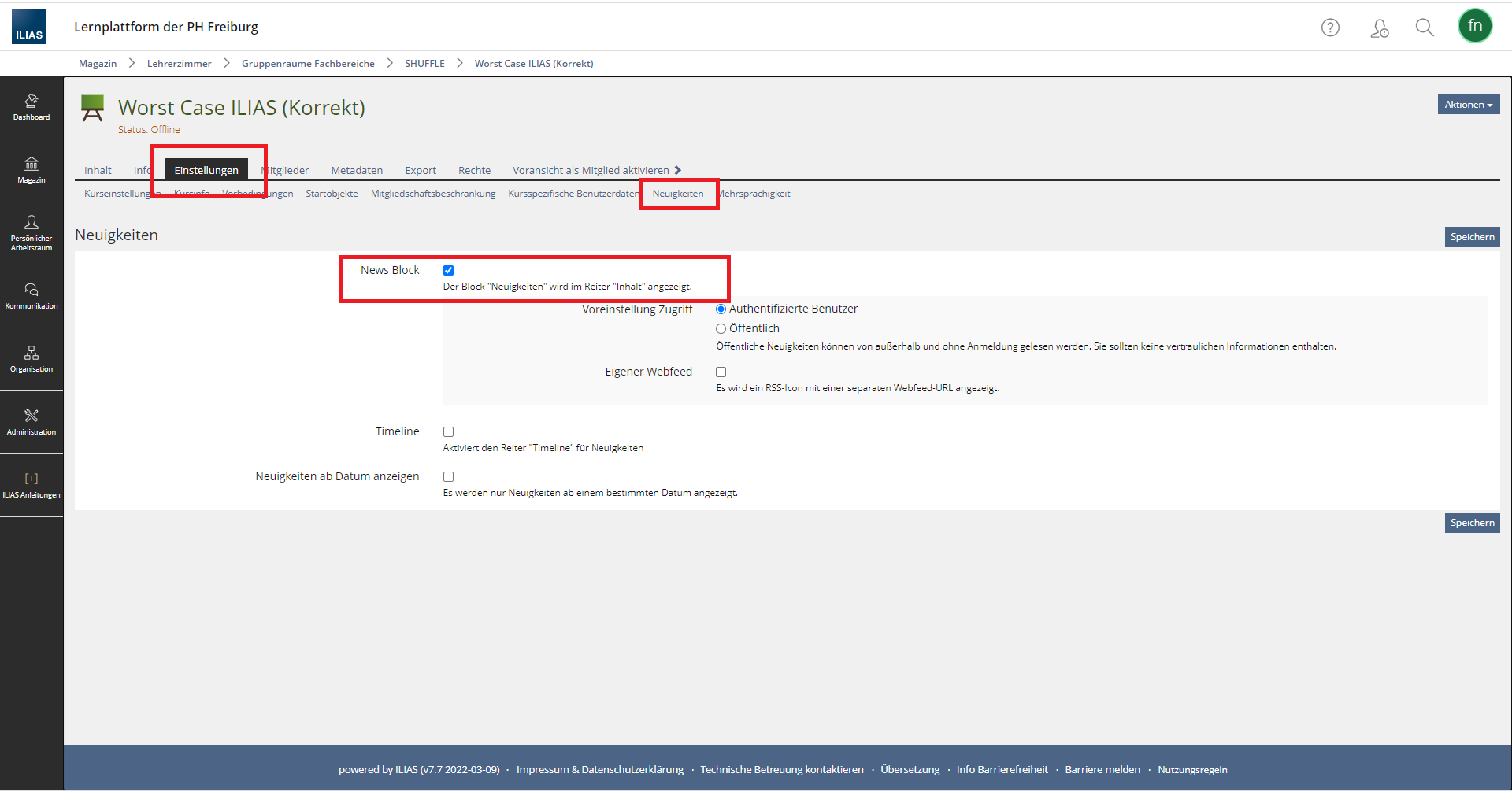 Fig. 2: News feed settings.
Carousel/Accordion
A carousel is an animation in which various elements from a list are displayed at a fixed interval. The content changes automatically. This poses a problem in terms of digital accessibility. According to BITV 2.0, moving content must be able to be switched off – which is not the case with a carousel.
Problems that may arise
Many users find it difficult to read the content in the carousel as it keeps disappearing. Furthermore, users may struggle to concentrate on relevant course content if flashing or moving elements appear as distractions. This can quickly lead to sensory overload. If the carousel is set to run too fast, this could, in the worst-case scenario, trigger epileptic seizures. Similarly, moving content poses problems for users with motor impairments.
It is therefore not advisable to use the carousel.
Interactive image
An interactive image is an image containing additional content elements at specific hotspots, such as further images, text or other media. When the user clicks on a predefined area or hovers the mouse over it, the additional information is displayed.
From an educational perspective, this object can be valuable as it conveys information in an interesting and interactive way. However, the interactive image is not accessible to users with motor impairments, as it cannot be controlled via the keyboard. Furthermore, the content of the source image, with its defined hotspots, is difficult to summarise in a concise alternative text – a detailed description would be required.
It is therefore not possible to experience or use this interactive image, even with the aid of assistive technologies.
Tables
The tables that you can insert, for example, on the home page or a content page (see Fig. 5) are, unfortunately, not accessible. The column and row headings are not correctly marked up using the "<th>" element, which, at code level, indicates that these rows and columns are headers and therefore headings. This makes it difficult for assistive technologies to interpret the content correctly.
We recommend designing your course in such a way that it is accessible to all students and can also be easily processed by assistive technologies. You should therefore avoid using tables and interactive images on ILIAS.
Types of exercises
Not all of the exercise types listed under the "Test" object are accessible either. You should therefore choose the exercise types carefully here as well.
Under "Digital and E-exams", you will find a detailed list of the exercise types that, for accessibility reasons, should not be used or should only be used in specific scenarios.
No comments to display
No comments to display